Deal
Deal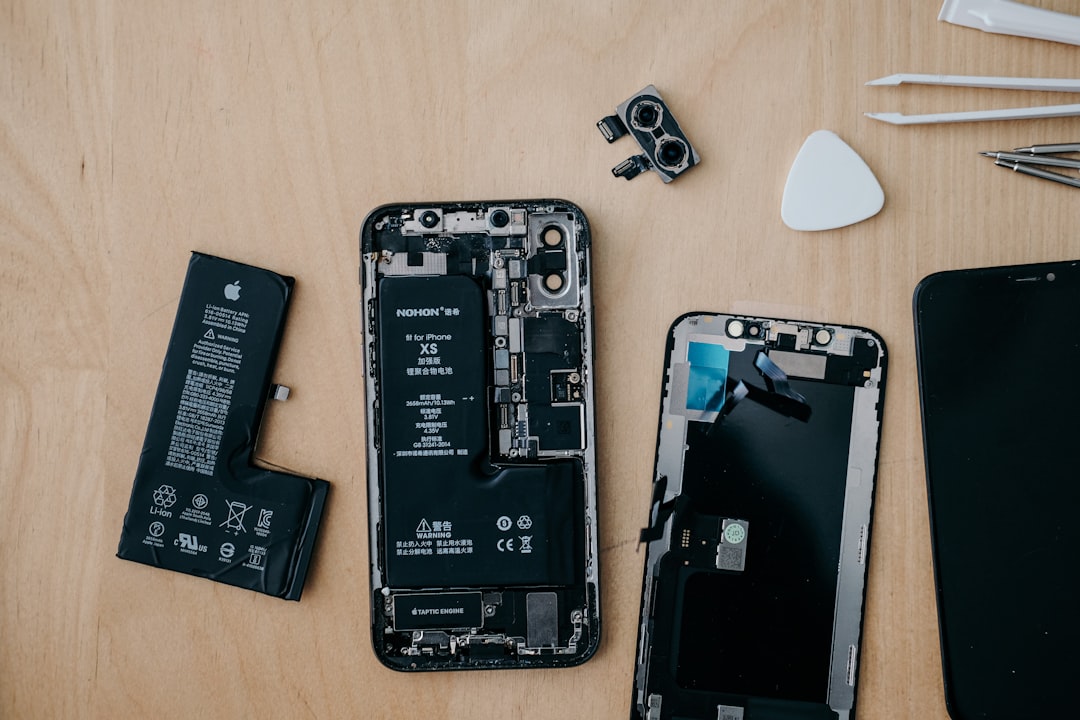
My iPhone was driving me absolutely crazy. By 2 PM, it was begging for a charger, and I found myself carrying a portable battery everywhere. Sound familiar? I was ready to drop $800 on a new phone when my tech-savvy friend asked me a simple question: "When's the last time you checked your battery health?"
That question saved me over $600. Turns out, my two-year-old phone didn't need replacing – it just needed a new battery. And I'm not alone in this discovery.
The Hidden Truth About Phone Performance
Here's what the phone companies don't want you to know: most "slow" phones aren't actually outdated – they're just running on dying batteries. I learned this the hard way after years of upgrading unnecessarily.
Your phone's battery starts degrading from day one. After 500 charge cycles (roughly 18-24 months for most users), lithium-ion batteries lose about 20% of their original capacity. But here's the kicker – your phone doesn't just lose battery life, it loses performance too.
Apple admitted to this practice in 2017, revealing they intentionally slow down phones with aging batteries to prevent unexpected shutdowns. Android phones do similar throttling. So when your phone feels sluggish, it might not be because it's "old" – it's because the battery can't keep up.
How to Check if Your Battery Needs Replacing
Before you even think about a new phone, let's diagnose what's really going on. I wish I'd done this sooner – it would've saved me months of frustration.
For iPhones:
- Go to Settings > Battery > Battery Health & Charging
- Check your "Maximum Capacity" percentage
- If it's below 80%, replacement is definitely worth it
- If it's 80-85%, you'll likely notice significant improvement
For Android phones:
- Download AccuBattery or Battery Guru from the Play Store
- Let it run for a few days to get accurate readings
- Look for battery health below 80% of original capacity
My iPhone showed 73% battery health when I finally checked. No wonder it was dying so fast!
The Real Cost Breakdown: Replacement vs New Phone
Let me break down the numbers that convinced me to go the replacement route:
Battery Replacement Costs:
- iPhone battery replacement at Apple: $69-$89
- Third-party iPhone battery replacement: $30-$60
- Android battery replacement: $50-$120 (varies by model)
- DIY replacement kits: $15-$40 (if you're brave enough)
New Phone Costs:
- Flagship phones: $700-$1,200+
- Mid-range phones: $300-$600
- Budget phones: $150-$300
Even if you buy the cheapest new phone available, you're still spending 3-10 times more than a battery replacement. For me, spending $69 to get another 2-3 years from my phone was a no-brainer.
Pro tip: If your phone is less than 3 years old and the only issues are battery-related, replacement almost always makes financial sense. You'll get 80-90% of "new phone" performance for less than 10% of the cost.
When Battery Replacement Makes Sense
Not every dying phone deserves a battery replacement. Here's my decision framework after helping a dozen friends through this choice:
Replace the battery if:
- Your phone is 1-4 years old
- Battery health is below 85%
- The phone still receives software updates
- No major hardware issues (cracked screen, camera problems, etc.)
- You're generally happy with performance when plugged in
Consider a new phone if:
- Your phone is 5+ years old
- Multiple hardware components are failing
- Software support has ended
- The replacement cost is more than 25% of a comparable used phone
My Battery Replacement Experience
I decided to go with Apple's official battery replacement service. Yes, it cost $20 more than third-party options, but I wanted the peace of mind.
The process was surprisingly smooth:
- Scheduled an appointment online (got a slot for the next day)
- Backed up my phone completely
- Dropped it off at 10 AM, picked up at 6 PM
- Total cost: $69 including tax
The transformation was immediate and dramatic. My phone went from dying at 2 PM to lasting until bedtime. Apps opened faster, the camera launched quicker, and I could actually use GPS navigation without worrying about the battery.
Six months later, I'm still getting all-day battery life, and my phone feels as responsive as when I first bought it.
DIY vs Professional Replacement
I considered doing it myself to save money, but after watching some YouTube tutorials, I decided against it. Here's my honest assessment:
DIY Pros:
- Cheapest option ($15-$40)
- Satisfaction of doing it yourself
- No waiting time
DIY Cons:
- Risk of damaging your phone permanently
- Voids any remaining warranty
- Requires special tools and steady hands
- No guarantee on parts or labor
My friend tried the DIY route and ended up damaging his phone's display connector. What would've been a $60 professional job turned into a $200+ repair nightmare.
Finding the Best Replacement Deals
If you decide professional replacement is the way to go, here's how to save money:
Official manufacturer service: Most expensive but most reliable. Apple, Samsung, and Google offer battery replacement services.
Authorized repair shops: Often 20-30% cheaper than manufacturer prices with similar quality.
Independent repair shops: Can be 40-50% cheaper, but quality varies wildly. Read reviews carefully.
I always ask these questions before committing:
- What's the warranty on parts and labor?
- Do you use OEM or aftermarket batteries?
- How long will the repair take?
- What happens if something goes wrong during repair?
Maximizing Your New Battery's Lifespan
Once you've invested in a new battery, you want it to last. Here are the habits that have kept my replacement battery healthy for over six months:
- Avoid charging to 100% every night (shoot for 80-85%)
- Don't let it drop below 20% regularly
- Keep your phone cool – heat kills batteries
- Use low power mode when you don't need full performance
- Turn off background app refresh for apps you rarely use
These simple changes have kept my battery health above 95% even after six months of daily use.
The Environmental Bonus
Here's something that made me feel even better about my choice: battery replacement is incredibly environmentally friendly compared to buying new.
Manufacturing a new smartphone generates about 70-90 kg of CO2 emissions. A battery replacement? Less than 1 kg. Plus, you're keeping a perfectly good device out of the e-waste stream.
My old phone is now going on three years total, with at least another year of useful life ahead of it. That's way better than the typical 18-month upgrade cycle I was stuck in before.
Key Takeaway
Before dropping $300-$1,200 on a new phone, spend five minutes checking your battery health. If it's below 85%, a $30-$90 battery replacement might give you all the performance boost you need. I saved over $600 this way, got 2+ more years from my phone, and learned that "slow phone syndrome" is usually just "dying battery syndrome" in disguise. Your wallet (and the planet) will thank you.